Understanding Task Prioritization
In a world filled with endless notifications, meetings, and tight deadlines, mastering the art of task prioritization can be a game-changer for both individuals and teams. Effective prioritization is not just about making a to-do list but also about understanding the importance and urgency of tasks. Fortunately, the advent of digital tools has provided a significant advantage in managing this complexity.
The Benefits of Digital Task Management Tools
Utilizing these tools isn’t merely about keeping organized; it’s about enhancing your overall workflow. Here are some substantial benefits:
- Increased Productivity: Digital task managers often feature visual aids such as Kanban boards or Gantt charts, allowing you to see your tasks in relation to your larger goals. For instance, a project in Trello can be divided into lists such as “To Do,” “In Progress,” and “Done,” which helps you track progress at a glance.
- Enhanced Collaboration: In a remote work environment, tools like Asana or Notion allow teams to share tasks easily, assign roles, and set deadlines. Imagine a marketing team brainstorming ideas on a project in Notion; everyone can contribute in real time, leading to better outcomes and greater participation.
- Real-time Updates: With tools like Microsoft To Do, you can receive instant notifications on task progress or changes made by a colleague. This real-time feedback loop fosters an agile work environment where modifications can be made swiftly based on current priorities.
Choosing the Right Tools for You
There is no one-size-fits-all solution when it comes to task management tools. As you delve into options like Trello, Asana, Todoist, and Notion, it’s vital to consider what features will best suit your needs. For instance:
- Do you need a simple interface to jot down daily tasks, or are you managing complex projects requiring detailed timelines?
- How important is integration with other software you actively use, such as Google Drive or Slack?
- Is mobile accessibility essential? Many tools offer robust mobile versions that keep you connected and organized on the go.
Maximizing Efficiency
In today’s fast-paced environment, learning how to effectively use these digital productivity tools can significantly alter your daily operations. By refining your approach to task prioritization, you empower yourself to focus on high-impact tasks that yield the best results. Why waste energy on tasks that hold little value when you can leverage technology to pinpoint priorities?
As we continue to navigate the evolving landscape of digital productivity, it’s important to experiment with different tools and methods. Don’t hesitate to seek out resources and communities dedicated to optimizing productivity; the insights you gain may just be the key to unlocking a more efficient work style.
DISCOVER MORE: Click here to uncover the importance of prioritization frameworks
Key Features to Look for in Digital Task Prioritization Tools
As the landscape of work continues to evolve, understanding what makes an effective digital task prioritization tool can elevate your efficiency to new heights. These tools are equipped with various features tailored to optimize workflow and ensure tasks are tackled in the most effective order. Below are key features to consider when selecting the right tool for your needs.
- Customizability: Every individual and team has unique needs. A tool that allows for a customizable experience—like varying statuses of tasks, priorities, and project stages—can make a significant difference. Users can create workflows that match their specific processes, rather than adjusting their work style to fit the software.
- Task Dependencies: Understanding the relationship between tasks is crucial. Tools like Asana allow you to set dependencies among tasks, ensuring you prioritize essential tasks that may hold a domino effect on subsequent activities. This can be critical in project management, where delays in one area can affect overall timelines.
- Time Tracking: Integrating time tracking within your task prioritization tool can provide invaluable insights into how long tasks actually take versus original estimates. Tools such as Todoist and ClickUp incorporate time tracking features, enabling you to refine future estimates and prioritize based on empirical data.
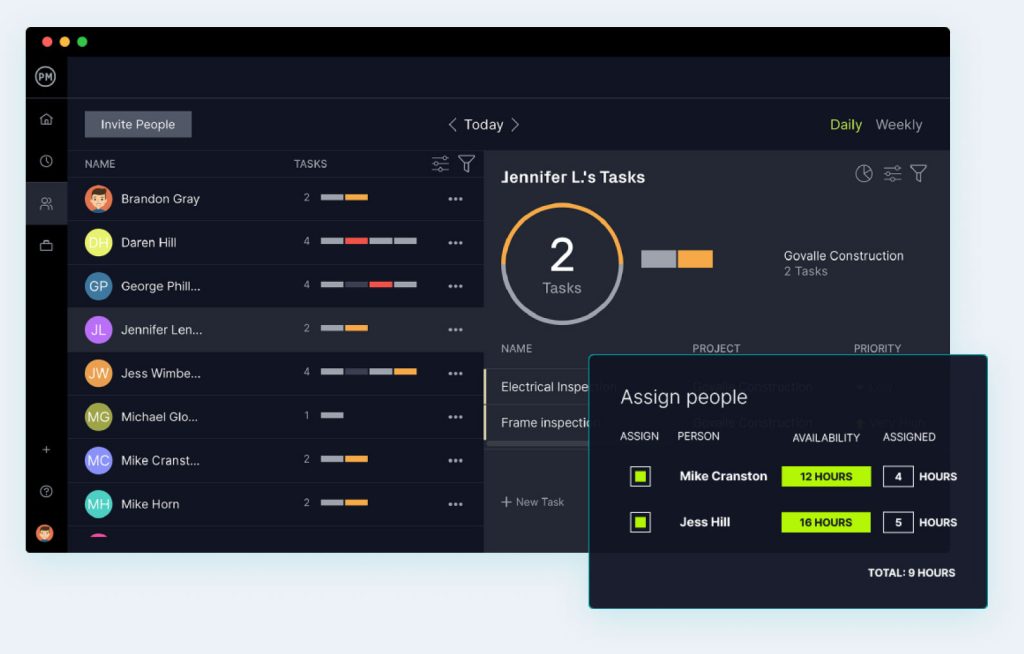
- Collaboration Features: Collaborating with team members is often a crucial part of task management. Tools that provide comment sections, file attachments, and real-time updates facilitate smoother teamwork. The ability to tag colleagues and assign tasks ensures accountability and fosters open communication.
- Integration Capabilities: The ability to connect with existing tools you use daily can simplify your workflow. Whether it’s Google Calendar for scheduling, Slack for communication, or Zoom for meetings, seamless integration means less time juggling between apps and more time focusing on high-priority tasks.
Adapting to Your Work Environment
Choosing the right digital tool for task prioritization also involves evaluating your work environment. Are you part of a remote team, or do you primarily work independently? Tools like Monday.com and Basecamp emphasize collaboration, making them ideal for teams. Conversely, individuals may benefit from simpler tools like Microsoft To Do, which allow for straightforward task management without the complexity.
Furthermore, assess your current projects’ scale. For extensive projects with multiple phases, a comprehensive tool with timeline views and resource allocation features can prove beneficial. On the other hand, if your work revolves around daily tasks, a minimalistic approach may suffice.
Ultimately, by understanding the robust features offered by digital task prioritization tools and aligning them with your unique work style, you set the stage for a more optimized workflow. Prioritization is no longer a guessing game; with technology as your ally, managing your time and tasks effectively is within reach.
Exploring Digital Tools for Efficient Task Prioritization
In today’s fast-paced environment, effectively managing tasks is crucial for productivity. Digital tools designed for task prioritization not only help streamline workflows but also enhance decision-making processes. Let’s delve into how these innovative solutions can empower your working style.
Assessing the Landscape of Task Management Applications
There are numerous task management applications available, each with unique features tailored for different user needs. Tools such as Todoist and Trello have gained popularity by offering intuitive interfaces and customizable options. With the ability to categorize tasks, set deadlines, and collaborate with teams, they provide a comprehensive approach to handling workloads efficiently.
Real-Time Collaboration and Transparency
One significant advantage of utilizing digital tools for task prioritization is the enhancement of real-time collaboration. Platforms like Asana and Monday.com facilitate team communication by allowing members to assign tasks, track progress, and provide feedback. This not only promotes accountability but also ensures that everyone is aligned towards common objectives. The transparency these tools bring can significantly reduce the chances of overlapping responsibilities or missed deadlines.
Incorporating AI for Smart Prioritization
The integration of artificial intelligence into task management apps is revolutionizing how priorities are set. Features like automated scheduling, predictive analytics, and dynamic reminders enable users to focus on what truly matters. Tools such as ClickUp leverage AI capabilities to suggest which tasks to prioritize based on urgency and past work patterns. By harnessing these technologies, individuals can maximize their productivity while minimizing stress.
Mobile Accessibility: Task Management on the Go
In an era where mobility is paramount, many digital task prioritization tools offer mobile-friendly applications. This flexibility allows users to manage their tasks seamlessly from their smartphones or tablets. Being able to add, edit, or check off tasks while on the move ensures that your workflow remains uninterrupted, no matter where you are.
| Category | Description |
|---|---|
| Enhanced Focus | Digital tools help filter out distractions, enabling a focused work environment. |
| Time Management | Allow for better time allocation, ensuring tasks are completed efficiently. |
By exploring these features and advantages, individuals and teams can harness the potential of digital tools to transform their workflow. Investing time in finding the right solution aligned with your needs can lead to remarkable improvements in productivity and overall job satisfaction. Investigating further into these tools could unlock new levels of efficiency in your daily tasks.
DISCOVER MORE: Click here to enhance your productivity
Harnessing the Power of Artificial Intelligence in Task Prioritization
As digital tools for task prioritization continue to evolve, many are now integrating artificial intelligence (AI) capabilities to enhance user experiences and refine workflow management. AI-driven tools like Trello, which incorporates AI-powered automation with its Butler feature, allow users to automate repetitive tasks and set intelligent reminders based on user behavior. This not only streamlines processes but also frees up precious time, enabling users to focus on high-priority tasks.
Moreover, tools like ClickUp leverage AI to analyze task completion patterns and suggest the most effective prioritization strategies. Imagine having an assistant that learns how you work and helps you identify bottlenecks before they become overwhelming. This predictive capability can be a game changer for individuals and teams looking to maximize productivity.
Real-Time Analytics for Smart Decision-Making
In today’s fast-paced work environment, data-driven decision-making is essential for keeping projects on track. Digital task prioritization tools equipped with real-time analytics allow you to evaluate how tasks are progressing and which ones require immediate attention. Platforms like Wrike offer comprehensive dashboards that visualize real-time data, showing how much time is spent on various tasks and which team members are overloaded.
This data can be invaluable for adjusting workloads dynamically and ensuring that high-impact tasks are consistently prioritized. By harnessing analytics, users can easily measure key performance indicators (KPIs) associated with task completion rates, helping refine future strategies based on concrete evidence rather than assumptions.
The Impact of Mobile Accessibility
The modern work environment is increasingly mobile, with many professionals working on-the-go. Thus, choosing a task prioritization tool that offers robust mobile accessibility is critical. Tools like Todoist and Microsoft To Do provide fully functional mobile apps, allowing users to manage tasks anytime, anywhere.
With mobile accessibility, tasks can be prioritized based on real-time updates, and users can easily adjust their to-do lists as new tasks arise. This adaptability ensures that professionals can maintain productivity—even if they are away from their desks. Furthermore, notifications and reminders sent directly to a smartphone help keep users informed and organized, providing prompt nudges to focus on priority tasks.
Social Collaboration Through Task Management
In an era where remote work is increasingly common, the need for social collaboration tools within task prioritization platforms has never been greater. Tools such as Notion and TeamGantt not only promote transparency by allowing team members to see task statuses but also facilitate discussions directly within the task platform. This ensures that everyone stays in the loop and can contribute to task prioritization based on changing project needs or new inputs.
Diving deeper into social collaboration, these platforms often feature shared calendars and voting mechanisms, enabling teams to collectively decide which tasks should take precedence. This kind of collaborative prioritization fosters group buy-in and can lead to enhanced motivation, as every team member feels involved in the decision-making process.
Overall, the fusion of AI, real-time analytics, mobile access, and social collaboration features within digital task prioritization tools presents a transformative opportunity to work more efficiently in today’s dynamic environments. By fully leveraging these advancements, individuals and teams can fine-tune their workflows, effectively enhancing productivity and achieving their goals. As you explore your options, keep an eye on how these elements can be integrated into your daily operations for seamless task management.
DIVE DEEPER: Click here to learn how to prioritize your tasks effectively
Conclusion: Embracing Digital Tools for Enhanced Productivity
In an increasingly complex and fast-paced work environment, digital tools for task prioritization have emerged as indispensable assets for professionals aiming to optimize their workflows. By leveraging cutting-edge features such as artificial intelligence, real-time analytics, and mobile accessibility, individuals and teams can effectively transform the way they manage tasks. From automating mundane processes to providing predictive insights, these tools not only enhance productivity but also empower users to make informed decisions based on real-time data.
Furthermore, the integration of social collaboration functionalities fosters a more inclusive work culture where team members feel engaged in the prioritization process. This collaborative effort not only boosts motivation but also ensures that everyone is aligned toward common objectives. As remote work continues to be a prevalent norm, prioritization tools that allow seamless communication and task tracking become essential for sustained success.
Ultimately, the key to unlocking your full potential lies in choosing the right digital task prioritization tool that aligns with your specific needs and work style. Whether you’re a freelancer juggling multiple projects or a team striving for greater efficiency, embracing these technological advancements can significantly advance your productivity. As you embark on your journey to refine your workflow, explore the immense possibilities these tools offer, and take confident strides toward achieving your goals.
Related posts:
The Relationship Between Task Prioritization and Systems Theory: A New Perspective on Productivity
How to Use the ABCDE Method for Effective Task Management
How the Eisenhower Matrix Can Transform Your Approach to Task Prioritization
How Task Prioritization Can Boost Your Mental Health and Well-Being
Leveraging Technology: Apps and Tools for Prioritizing Daily Tasks
How Chaos Theory Can Help in Task Prioritization in Dynamic Environments

Linda Carter is a writer and productivity and personal organization specialist focused on helping readers build better routines, manage their time, and stay on top of daily priorities. With experience covering practical planning methods, habit-building strategies, and tools for organization, Linda shares actionable guidance on our platform. Her goal is to empower readers with clear, realistic tips to work smarter, reduce overwhelm, and stay consistent over time.